Showing posts with label repositories. Show all posts

Friday, September 14, 2007

Ubuntu Server on Pentium II


For a Pentium II machine I recently revitalized, I wanted to install only the most essential software, so I started from the Ubuntu Server 6.06.1 CD. I did an expert install, since this particular motherboard, an Elitegroup (ECS) P6BX-A+ with Award BIOS, doesn't play nice with GRUB. Plus I planned on some little tweaks, like setting a static IP from the get-go and making a more server-like partitioning scheme.

NOTE: Unless you specify otherwise via the expert installer, Ubuntu disables login as root.

After completing the base installation, during which I opted to use all available repositories, I updated the package indices and installed the necessary packages for X, plus a window manager and other conveniences.
sudo apt-get update
sudo apt-get upgrade
sudo apt-get install x-window-system-core xdm fluxbox xterm
Then I rebooted and was delighted to find the X server started without a single problem.

While installing additional packages, I discovered that it took an intolerably long time to connect to the repositories. Once I installed Firefox, I observed similar delays in loading pages. For some reason, disabling IPv6 (via about:config) got Firefox working, but apt-get remained sluggish. So I used traceroute in the hope of finding the cause.

Apart from the delay in passing through the gateway, which I also observed on my Debian box when I traced the same route for comparison, it wasn't resolving domain names. Instead of the expected output,
traceroute to us.archive.ubuntu.com (91.189.89.8), 30 hops max, 40 byte packets
1 192.168.1.1 (192.168.1.1) 1.931 ms 1.680 ms 1.782 ms
2 * * *
3 XX-N-N-XXNN.XXXXXXX.pa.panjde.comcast.net (NN.NN.NNN.NN) 8.599 ms 7.877 ms 9.530 ms
4 XX-NN-XXNN.XXXXXXX.pa.panjde.comcast.net (NN.NN.NNN.NNN) 9.573 ms 8.122 ms 9.572 ms
5 XX-NN-XXNN.XXXXXXXX.de.panjde.comcast.net (NN.NN.NNN.NNN) 10.248 ms 8.929 ms 9.522 ms
6 po-10-ur01.norristown.pa.panjde.comcast.net (68.86.209.98) 10.724 ms 9.759 ms 9.519 ms
7 po-10-ur02.norristown.pa.panjde.comcast.net (68.86.209.102) 9.838 ms 10.222 ms 9.526 ms
8 po-21-ar01.wallingford.pa.panjde.comcast.net (68.86.209.106) 12.028 ms 11.325 ms 11.952 ms
9 68.86.91.182 (68.86.91.182) 14.310 ms 14.387 ms 14.187 ms
10 68.86.85.2 (68.86.85.2) 13.551 ms 13.315 ms 14.142 ms
11 68.86.84.153 (68.86.84.153) 17.783 ms 16.573 ms 17.901 ms
12 te-1-3-pr01.ashburn.va.ibone.comcast.net (68.86.84.154) 18.032 ms 16.492 ms 16.894 ms
13 xe-3-1-0.was11.ip.tiscali.net (213.200.84.117) 16.672 ms 17.544 ms 16.504 ms
14 so-6-1-0.lon11.ip.tiscali.net (213.200.80.26) 94.043 ms 93.927 ms 93.544 ms
15 01502-004-01-gw.ip.tiscali.net (213.200.77.114) 93.777 ms 93.384 ms 93.506 ms
16 195.72.129.70 (195.72.129.70) 92.104 ms 90.699 ms 91.123 ms
17 byrd.canonical.com (91.189.88.11) 93.688 ms 93.222 ms 94.142 ms
18 * * *
every line looked like lines 9-11 above: no FQDN, only an IP. That pointed to a DNS problem. So I opened resolv.conf and found that the resolver had been using my router as its name server—a less than ideal configuration, since my router is an entry-level Linksys. I merely changed resolv.conf to read
search hsd1.pa.comcast.net.
nameserver 68.87.75.194
nameserver 68.87.64.146
and restarted networking services:
sudo /etc/init.d/networking restart
and it worked flawlessly.

The server install achieved exactly what I envisioned for this box: low resource usage. Here's the process tree right now, with one user active.
init─┬─atd
├─cron
├─cupsd
├─dd
├─events/0
├─6*[getty]
├─khelper
├─5*[kjournald]
├─klogd
├─ksoftirqd/0
├─kswapd0
├─kthread─┬─aio/0
│ ├─kacpid
│ ├─kblockd/0
│ ├─kgameportd
│ ├─khubd
│ ├─kseriod
│ └─2*[pdflush]
├─mdadm
├─migration/0
├─shpchpd_event
├─sshd───sshd───sshd───bash─┬─firefox-bin───2*[{firefox-bin}]
│ └─pstree
├─syslogd
├─udevd
├─watchdog/0
└─xdm─┬─Xorg
└─xdm
Yes, I'm writing this post in Firefox on the Ubuntu server with X forwarding to my laptop. Remember, this is a Pentium II at 450MHz, circa 1998. Legacy hardware has a place in modern computing—in the third bedroom, right beside my main Debian box.

Thursday, February 01, 2007

Dapper worthy of long-term support

I decided to upgrade my desktop OS to Ubuntu 6.06 LTS "Dapper Drake." The LTS stands for long-term support. That is, Canonical has pledged to provide support for Dapper for three years from its release date. I guess, with Dapper, they knew they had a keeper.

Set aside for a moment the fact that the install CD includes a video of an interview with Nelson Mandela, in which he expounds on the meaning of "ubuntu." It's over the top, if you ask me.

This is solid distro. The CD includes all the necessary packages for a working GNOME desktop environment, plus a wisely limited selection of popular applications. This design decision stands in sharp contrast to the one manifest in Debian, in which the list of basic desktop packages is horribly bloated. (That this is a long-standing criticism of Debian doesn't make it less valid.) I was pleasantly surprised to find that Ubuntu installed the desktop environment and only a small handful of applications, giving me the opportunity to choose what else, if anything, to install.

What's more, the hardware detection went almost flawlessly. I added aic7xxx=no_probe to the boot options, and it "just worked." I didn't even have to edit my xorg.conf with the horizontal sync and vertical refresh rates. The optimal settings for my monitor, a Dell 1703FP, are 1280 x 1024 @ 60Hz. It's set at 75Hz, but I'm fine with that.

It was also easy to add repositories. I went to UbuntuGuide.org and overwrote my sources.list with the one provided there. It worked like a charm; I got all the packages I needed and then some.

Last but not least, I can access the shared files/folders on the other desktop on our network, which runs Windows XP. I connect to smb://guest@HOSTNAME/SHARENAME. The hostname can be replaced with the server's IP address. This has been reported to work in some situations where the hostname isn't recognized. It works both ways on my network. There must be a way to connect using a password-protected account, but I haven't investigated this thoroughly.

So I'm feeling quite satisfied. However, to be fair, I do have a small handful of grievances with this release, which I may as well air here (in bullet points because I'm short on time):
  • I didn't see option to set the root password during the install process. I need to look into this because I'm worried the default is something asinine like "admin". Luckily the installer adds your first user account to the list of sudoers, so you're still able to edit system internals.
  • If you decide not to partition your hard drive manually, the automatic partitioning scheme available puts everything—except the swap, of course—on a single ext3 partition. By contrast, Debian lets you choose between three schemes: a single partition, a separate home partition and separate partitions for almost everything.
  • The Ubuntu splash screen displays at some weird resolution, like 720 x 400. It doesn't seem to matter how you tell the live CD to set it. If you can specify a resolution for the splash when running from the CD, there must be a way to do it when running from the hard drive. This is a relatively low priority, though.
  • Emacs still isn't included in the desktop packages. This is an almost trivial issue, but one that continues to irk me.
With any other release, there would be many more bullets above. I'd say that's a strong argument in favor of Dapper and its potential for longevity.

Image from Nuxified.org

Wednesday, November 09, 2005

Totem Mozilla Plugin Unplugged

Since upgrading to Ubuntu Breezy 5.10, I found that video was broken in Firefox. I initially installed the MediaPlayerConnectivity extension I had used with Hoary 5.04 and disabled the Totem plugins for all video file formats. This worked well enough for everything except the trailers on Apple's web site. I suspect they're using the most sophisticated/"fancy" features of QuickTime, which causes Totem Mozilla Plugin—despite being disabled—to totally flip out and crash the browser. The Firefox UI doesn't provide any obvious way to uninstall the plugin, but it can be done. Here's how.

cd /usr/lib/mozilla/plugins
sudo rm *totem*


or, alternately

sudo rm -rf *totem*

I'm always wary of using forced recursive removal. I wouldn't recommend the second method, especially since the first seems to work equally well.

This should delete all files associated with Totem Mozilla Plugin. If you really wanted it back, I suppose you could reinstall the Firefox package. (You might have to use the one included on the Ubuntu installation CD.) The next step is replacing the Totem plugin with something else. The MPlayer plugin has improved considerably since Hoary, so that's what I'm using. The package is called mozilla-mplayer.* I opted to remove mplayer-386, which Synaptic will install by default, and replaced it with mplayer-nogui. I didn't want MPlayer cluttering up my Applications menu. I already had the necessary codecs installed because of xine. If you get a missing codec(s) error, you might have to download them from the MPlayer web site. Now everything works beautifully. Embedded media is a sweet, sweet reality for me.

* If I remember correctly, it's part of the multiverse repository. I can provide detailed instructions on how to enable repositories upon request.

Friday, August 05, 2005

Do you break just like a little girl?

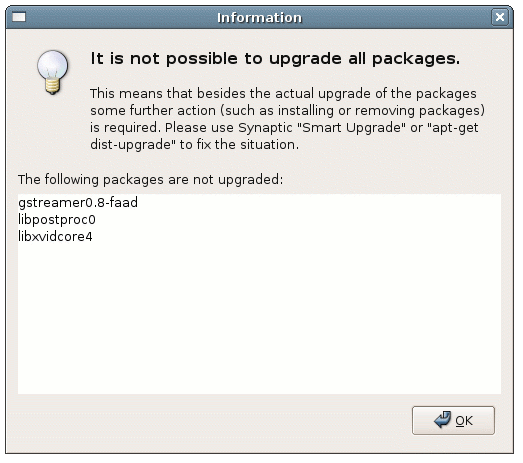
Now that I have Ubuntu working almost perfectly, it seems like the logical time to risk breaking my installation. You see, I recently added Christian Marillat's repository to my sources list. Ever since I did, Ubuntu Update Manager has been displaying an unusual message when it runs.


I tried using Synaptic to upgrade the packages it mentions, and in all three cases it told me that they require libc6 2.3.2.ds1-21 or higher. The highest version available from my current repositories is 2.3.2.ds1-20ubuntu13. I've decided to try Synaptic Smart Upgrade and see what happens. I used it once before and it broke a package, which it was subsequently able to fix. I'm a little nervous that this time it will break something and fail to fix it. There's only one way to find out…

Synaptic Smart Upgrade doesn't mark any packages. Let's see what happens if I run it from the terminal (apt-get dist-upgrade). No, it refuses to upgrade them. I'm both relieved and frustrated.

I would prefer my system to have all the latest packages, but I don't know where to get libc6 >=2.3.2.ds1-21. Maybe I'm missing some repositories in my sources list. I'll poke around the Unofficial Ubuntu 5.04 Starter Guide. I also remember seeing a page titled AddingRepositories on the Ubuntu Wiki, so I'll check there too. However, I want to address another issue first. Expect another post soon.

Update: I saw some posts on the forums that suggested I'm not the only one facing this problem. For now, the solution seems to be simply removing the Marillat repository from my sources list.

Friday, July 29, 2005

XMMS INXS

Enabling Ogg Vorbis and MP3 Playback in XMMS

I finally overcame my aversion to the unattractive XMMS interface long enough to install it and discover it doesn't work. I can add songs to the playlist, but as soon as I hit play the application stops responding. I opened the Terminal and tried running it from there. It greeted me with an error message.

libmikmod.so.2: cannot open shared object file: No such file or directory

Apparently XMMS couldn't find one of the libraries it needs. I went into Synaptic and searched for "mikmod". I didn't find an exact match, so I decided to consult the Unofficial Ubuntu 5.04 Starter Guide. The guide includes a long list of multimedia codecs in a section appropriately titled, "Q: How to install Multimedia Codecs?" I located the gstreamer0.8-plugins package in Synaptic and installed it. This could also be done in the Terminal.

sudo apt-get install gstreamer0.8-plugins

The error message didn't appear, but XMMS still refuses to play anything. Perhaps it's time to consult Ubuntu Forums. One poster suggests changing the XMMS output plugin. I pared his instructions down to three easy steps.
  1. Options -> Preferences (Ctrl+P)
  2. Audio I/O Plugins
  3. Select a different output plugin from the list.
With gstreamer0.8-plugins and the output plugin set to ESD, I can play Ogg Vorbis and MP3 files. For AAC files, I'll need additional plugins not found in the default repositories. So I must add the necessary repositories.

Adding Repositories

Before I start, I should back up the file I'll be editing.

sudo cp /etc/apt/sources.list /etc/apt/sources.list.bak
sudo gedit /etc/apt/sources.list


Now I edit the file.

[…]

deb http://us.archive.ubuntu.com/ubuntu hoary universe
deb-src http://us.archive.ubuntu.com/ubuntu hoary universe

deb http://security.ubuntu.com/ubuntu hoary-security main restricted
deb-src http://security.ubuntu.com/ubuntu hoary-security main restricted

deb http://security.ubuntu.com/ubuntu hoary-security universe
deb-src http://security.ubuntu.com/ubuntu hoary-security universe

deb http://archive.ubuntu.com/ubuntu hoary multiverse
deb-src http://archive.ubuntu.com/ubuntu hoary multiverse

## Backports
deb http://ubuntu-backports.mirrormax.net/ hoary-backports main universe multiverse restricted
deb http://ubuntu-backports.mirrormax.net/ hoary-extras main universe multiverse restricted


I save the edited file and update the package lists.

sudo apt-get update

AAC Playback

To play AAC files, I installed the gstreamer0.8-faad package. I used Synaptic again, but if you prefer you can use the Terminal.

sudo apt-get install gstreamer0.8-faad

Ironically, after all the time I spent getting XMMS working, it turns out gstreamer0.8-faad provides an AAC decoder for Rhythmbox but not XMMS. I checked several forums, and they all seemed to indicate that AAC playback in XMMS has yet to be perfected. Oh, well. I'll use Rhythmbox as I originally intended. Now I can listen to music while I fiddle with Ubuntu. I call that a major victory.


Our Next Episode

This weekend Live Gnude Girls will reveal the secrets of Direct Memory Access (DMA) and Advanced Linux Sound Architecture (ALSA). In other words, I'm going to get my CD-RW/DVD running faster than ever and make it possible for multiple applications to play sound at once. I'm looking forward to it.